How can AI help with your health? What it does well, and what it can't do


Why am I so tired all the time? Is this supplement actually doing anything? Should I be worried about my cholesterol?
At some point, most of us have typed questions like this into a search engine. And if you're doing that now, you're likely seeing an AI summary right at the top of your results. You might even be putting your question straight to an AI chatbot like ChatGPT, Claude, or Gemini.
Using AI for health advice is becoming more common. A 2026 KFF poll found that around 1 in 3 US adults had used an AI chatbot for health information in the past 12 months. And according to OpenAI, ChatGPT has 40 million users asking health questions.
AI is a powerful tool that can help us learn and understand more things than ever. But how helpful is AI when it comes to health advice, and how can you use it safely and effectively?
Let's break down what it's good at, where to be wary, and how to get the most out of it.
How AI chatbots can help with your health
As a starting point for understanding a health topic, an AI chatbot (and by this, we mean tools like ChatGPT and Claude) can be really useful.
Experts have started researching the different chatbots to unpick how effective they are.
A 2023 study asked ChatGPT to rewrite 26 health papers in ‘plain English.’ It found that the papers became easier to understand, and around 80% of the key messages stayed intact.
Here's where we think AI chatbots excel when it comes to health:
- Translating medical terminology: When a result, a leaflet, or a term in a doctor's letter doesn't make sense, AI is a quick way to get an explanation.
- Sense-checking a wellness claim: Social media is full of conflicting health advice. Asking AI to check a claim can give you a general idea of what the evidence says and what it doesn't.
- Summarising a study: If a piece of research comes up in a podcast or a newsletter, AI is a quick way to get the overview before deciding whether to read the whole thing.
- Drafting questions for your GP: Asking AI to help you prepare questions about something you've been dealing with can help you feel prepared.
Where they fall short
Generic AI isn't as helpful when you ask it real questions about yourself. Our bodies and personal circumstances are complex, and trying to feed all that context into a chatbot doesn't always work.
Basically, chatbots are good at explaining things, but they can struggle when asked real questions.
A 2025 study summarised in The Conversation by the lead researcher tested this. The researchers asked five of the most popular consumer chatbots (ChatGPT, Gemini, Grok, Meta AI, and DeepSeek) 50 real health questions. About half the answers came back problematic in some way.
This study identified some clear patterns where the chatbots tended to fall short:
- Generic chatbots get things confidently wrong: A 2025 study slipped fabricated medical details (like made-up lab tests, invented signs, and conditions that don't exist) into questions that they put forth to different AI chatbots. Rather than catching the false information, the models created confident explanations for things that don't exist.
- They don't know you: Generic AI is answering a generic version of your question. For example, "Should I take iron supplements?" can have a very different answer depending on your age, sex, and current iron status. Without that context, the answer you'll get won't be personalised or useful.
- Whatever you type becomes a data point: Health questions are some of the most personal information you'll ever share. Most consumer chatbots aren't designed under healthcare privacy rules, and your conversations can be used to train future versions of the model unless you've actively opted out.
What changes when AI knows your data
The point of this article isn't to say that AI is bad. Chatbots are useful, but they just don't know you, and they can't connect the dots between all the different aspects of your health.
We don't think AI will replace a real conversation with a doctor, but we do think that an AI chatbot built by doctors might be the next best thing.
Our team's doctors and engineers have spent months working on making this exist. The new Thriva AI Health Assistant has clinical judgement baked into its DNA, and it can look across your health data to give you specific, personalised answers to all your questions.
Imagine if the same conversations you've had with generic AI chatbots could see your last few blood tests, your sleep and activity patterns, and the things you've told it matter to you.
"How should I work out?" can become a specific answer that takes your health, lifestyle, current exercise habits, and biomarker data into account.
"Should I be worried about my cholesterol?" could tell you where your cholesterol has tracked over time, what's changed, and what to focus on between now and your next test.
"Why am I still tired after a full night's sleep?" becomes a real answer that connects your sleep data and biomarkers to help you understand what's going on.
Meet the Thriva Health Assistant
The Thriva Health Assistant is a health adviser that lives in your Thriva app. You can ask it questions, and it’ll take into consideration your blood test results, your biomarker trends, your wearable data, your activity and sleep, and the health profile you've shared with us. It’s there 24/7 to give you the support you need.
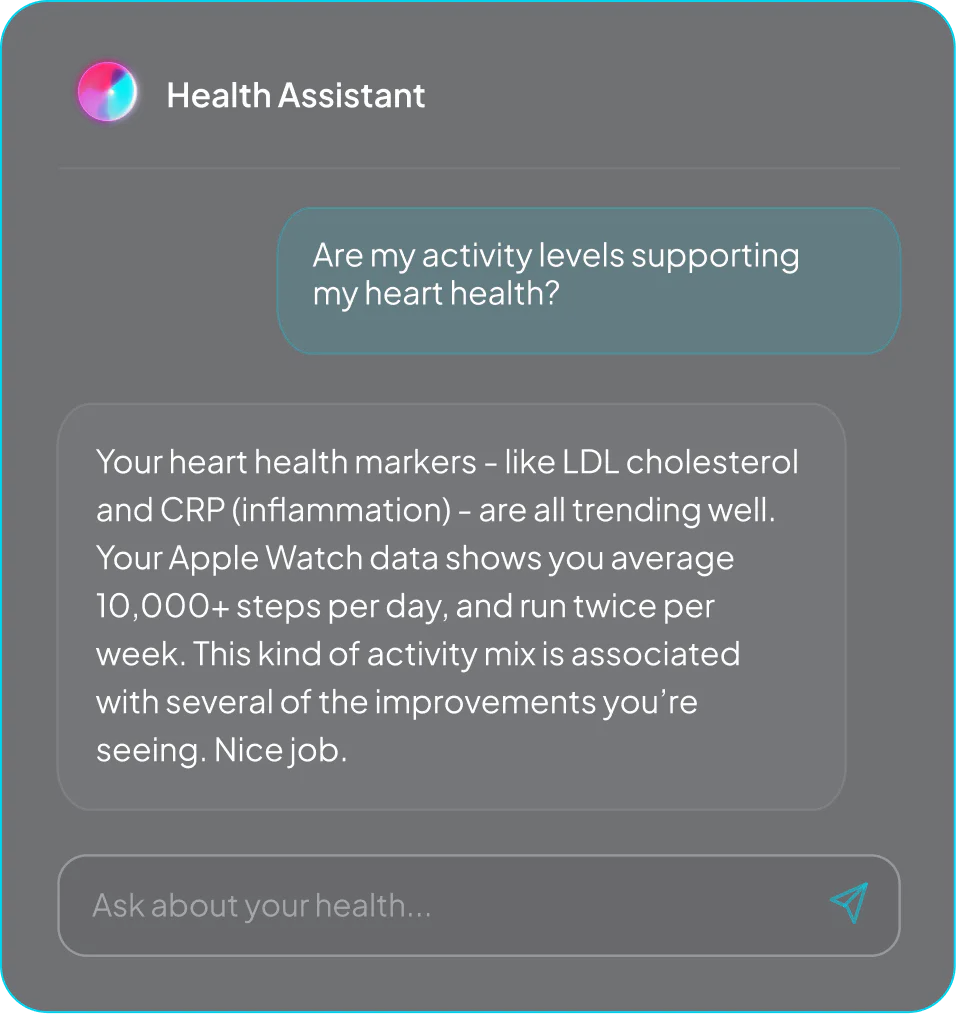
How it's different from generic chatbots:
- It already knows you: It can give you personalised advice because it knows what's going on in your body and what your goals are.
- Built with our clinical team: It knows what it should and shouldn't advise on, when to refer you to a professional, and how to flag uncertainty honestly.
- Your data stays in Thriva: It's stored securely and isn't shared with third-party AI providers or used to train models.
What's next
Try asking the Health Assistant one question this week.
To access it, open the Thriva app and click the heart icon in the bottom right corner of your screen.
The Health Assistant will prompt you with a few example questions, but you can also type your own question in the text box. You can ask it follow up questions, too.
- KFF (2026). KFF Tracking Poll on Health Information and Trust: Use of AI For Health Information and Advice.
- Ipsos (2025). Ipsos AI Monitor 2025.
- Fierce Healthcare (2025). 40M people use ChatGPT to get answers to healthcare questions, OpenAI says.
- Ayre, J., Mac, O., McCaffery, K. et al. (2023). New Frontiers in Health Literacy: Using ChatGPT to Simplify Health Information for People in the Community. Journal of General Internal Medicine, 39(4):573–577.
- Eickhoff, C. (2026). Half of AI health answers are wrong even though they sound convincing — new study. The Conversation. Summary of underlying 2025 BMJ Open study.
- Omar, M., Sorin, V., Collins, J.D. et al. (2025). Multi-model assurance analysis showing large language models are highly vulnerable to adversarial hallucination attacks during clinical decision support. Communications Medicine, 5(1):330.
- Ayre, J., Dunn, A.G., McCaffery, K. (2026). ChatGPT Health promises to personalise health information. It comes with many risks. The Conversation.